
InCatalog
Seamlessly synchronize your InDesign documents with your data sources
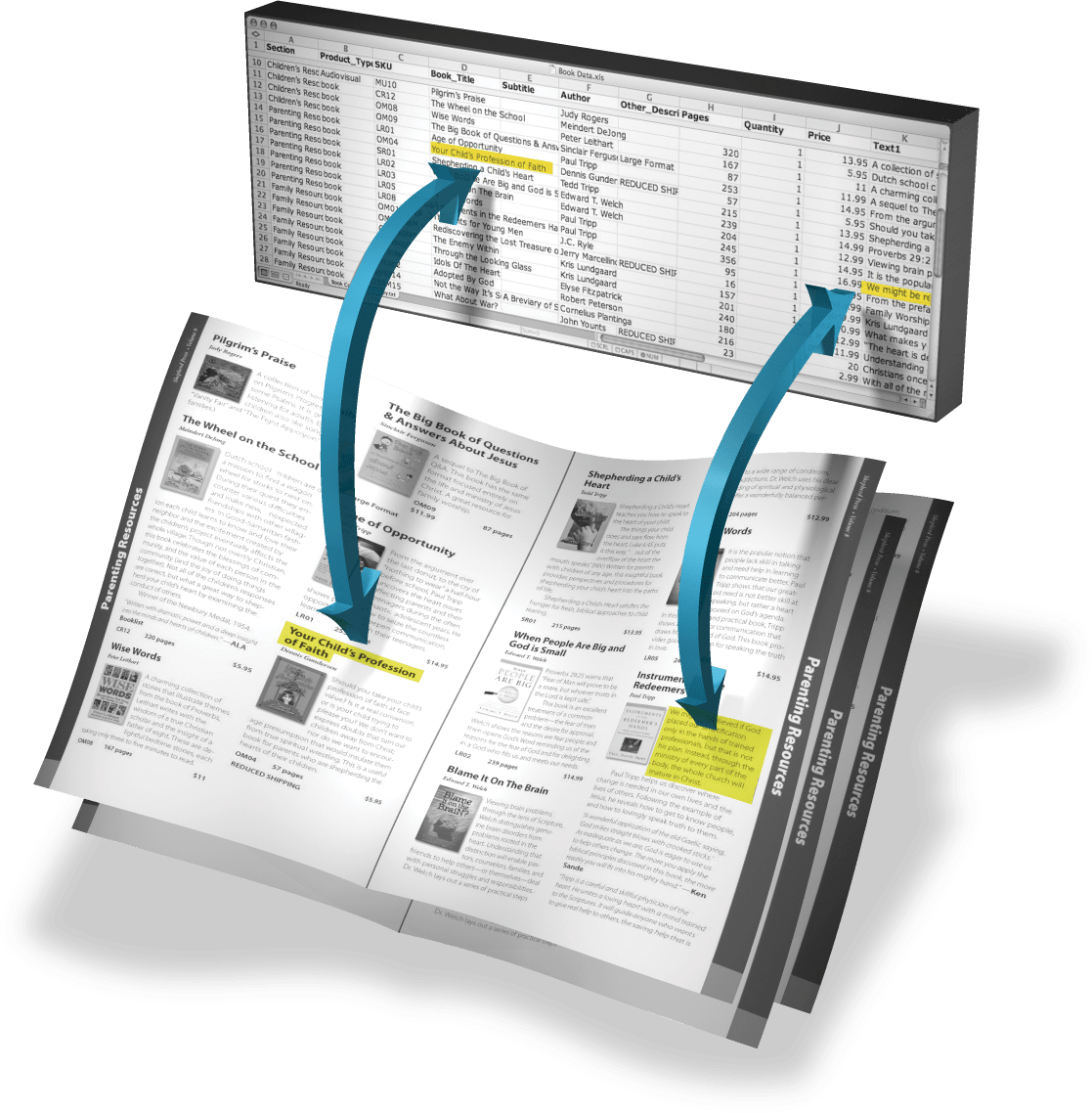
- InCatalog flawlessly synchronizes your InDesign documents’ contents with the contents of your databases and spreadsheets.
- Free yourself from critical worries about product prices, descriptions, sizes, etc. in your documents being up to date with the official source of your data, and vice versa.
- Synchronize everything, at any point, in either direction, in a matter of seconds, with a single menu invocation.
- Drag in pre-fab catalog modules from a library, fill in one key, and have the rest of the module fleshed out for you.
- Work hand-in-hand using InData to build pre-linked documents that can be updated at any point with InCatalog.
- InCatalog has been deployed in production since the year 2000, with thousands of users world-wide. It’s a rock-solid, industrial-strength data publishing solution.
- A trial takes just a couple of minutes to install, costs nothing, and gives you 15 days to try out all aspects of the product, including the Pro features.
- Read on for the full story, or use the top-of-page menu to jump directly to the relevant page section.
✻
✻
✻
The InCatalog story
If you’re a visual learner, before we get into the full story, here’s a 10-minute video walk-through introducing InCatalog. (For more depth, see the tutorial videos below.)
Connect your documents to your data

InCatalog, a plug-in for Adobe InDesign, with its easy-to-use data linker panel, enables you to create transparent links between your documents and your databases or spreadsheets. Once you have links in place, you can update prices, graphics, or product information with a simple menu invocation Update Document.
With InCatalog, you can rest assured—your documents will always reflect your database contents.
Applications
InCatalog is designed to update prices, graphics, or product information with one-click ease, in just about any kind of catalog, price list, travel schedule, directory, one-to-one marketing flyer, etc.
Or, for example, if you have different pricing regions in a catalog, InCatalog can swap the prices in for each region automatically.
InCatalog can also extract updated document information so you can keep your database in synch with what you’ve changed in your documents, if that’s how your work flows best.
Features and benefits
solve version control headaches
Be sure that your document shows the latest info and prices in your database, and that your database shows last-minute changes you’ve made to your document.
update in both directions
Make changes in either the document or the database, and push the changes in the other direction with no extra work. (No need for intermediate steps such as report creation and extraction.)
enjoy flexible data sources and destinations
Use off-line simple delimited text data “snapshot” files, on-line FileMaker Pro (and Runtime) databases under macOS, and on-line SQL databases such as MySQL, PostgreSQL, Oracle, SQL Server, and Access, using ODBC under macOS and Windows (Pro license).
use transparent data linking
Use the intuitive linking panel to establish links between any database element and any document text element—from a single character to a phrase to a paragraph to a whole story—or any picture element.
Forget about links affecting the printing process (they don’t affect any page layout), but view links on the screen (if you choose) so you can see what you’re doing.
Move links between documents and libraries transparently, for ease of building new documents from old document elements with links intact.
update interactively as you work
Use the linking panel’s interactive update capability to update the current single link, whole frames/stories, whole groups, or the current spread, even update automatically each time you make a change.
greatly speed up page creation
With pre-linked modules in libraries, drag a module, fill in a key value in one link, and watch the plug-in fill in the whole module automatically.
use one-step batch updating
With just one menu selection, make sure all linked document elements match their corresponding database elements.
work with multiple documents and data sources/destinations
Use multiple open documents and use multiple data sources and destinations for complex jobs, even per-document, switching among them as needed.
get automatic price styling
Define any number of price styles per publishing project using full tagged text for arbitrary formatting, apply those styles per-link, and have prices fully styled as part of the automated update.
use powerful key linking options
Select different strategies for obtaining a link’s key field value: direct from the link, direct from the linked contents, indirect from another direct link in the current group, or indirect from linked text before or after the current link.
With grouping and indirect keys, build whole modules that require only one key to be set to fully link everything in the module, or build lines or paragraphs of multiple links that are controlled from a single item.
use tagged text
Enable tagged text support on any link, to capture the full InDesign Tags or Xtags document formatting for any data element.
capitalize on multiple picture placement options
Update graphics, automatically resizing them to fit their destination frame in various ways, or to be left sized as-is.
be flexible in graphic file naming
Point InCatalog to your picture folders, using aliases/shortcuts in your project control folder. Enable “fuzzy lookup,” which even finds linked graphics files that have filename prefixes or file types/suffixes not given by the data.
automate with scripting
Script all updating operations for powerful workflow automation.
enjoy full Unicode support
Use the full Unicode character set in various encodings, for all data files and ODBC connections.
Catalog production challenges
What if the sales folks change prices or descriptions in the database at the last minute—did you catch all their changes for all products affected?
Using a single InCatalog menu selection (InCatalog > Update Document), you update your document pages from the database and catch all last-minute changes.
What if you’ve made last-minute editorial or pricing changes to your document—will you remember to update the master database in every case?
Using a single InCatalog menu selection (InCatalog > Update Data), you update your master database to match your current document contents.
How are you going to import and manually format pages and pages of flowing product descriptions, tables, prices, and pictures without endless labor and error-prone editing?
Using the companion product InData, you flow in all your data, fully formatted and fully linked to the database, ready for last-minute updates and extractions with InCatalog.
How are you going to build pages and pages of product modules, without endless labor and error-prone editing?
Using pre-linked library modules for each basic module format, you drag in a module, set one link’s key field, and InCatalog flows in all the rest of the module contents (text and graphics) automatically.
Do you really have to open all your catalog document spreads and update them one by one?
With scripting support in InCatalog, you script the updating (or extracting) of any number of documents with one click.
How do you get the data from your company’s “big iron” databases (Oracle, Sybase, SQL Server, MySQL, PostgreSQL) into your documents, or back out?
With InCatalog Pro’s ODBC support, you directly access these databases from the comfort of your desktop.
How are you going to get low-level formatting in data elements such as product descriptions, making words or phrases bold, italic, etc.?
Using InCatalog’s tagged text feature, you enter simple Xtags or InDesign tags in your data to create the desired formatting.
How are you going to handle the various price formats in your catalog without endless and tedious fiddling as the data changes and your style decisions change?
Using InCatalog’s price style feature, you mark each price with the appropriate style (which specifies how to format a price), and change styles globally as needed. During document update, the plug-in updates each price, formatting the price contents according to the rules given by its price style.
Pro vs. non-Pro
A standard license enables InCatalog to work with delimited text data “snapshot” files produced by your database or spreadsheet application, and (under macOS) on-line with FileMaker Pro (and FileMaker Pro Runtime) databases.
A Pro license unlocks the ODBC capabilities of InCatalog, which can then update documents directly from and to ODBC-accessible databases such as MySQL, PostgreSQL, Oracle, SQL Server, Sybase, Access, etc.
✻
✻
✻
What users say
Here’s a sampling of the feedback we’ve received from InCatalog users over the years (and earlier, from Xcatalog users). See InCatalog testimonials for a whole page at a time.
(You can scroll through the testimonials in place using the previous/next page arrows below. Click the title of any longer testimonial ending in “…” to see the rest.)
-
“we’re coming up on 10yrs using InCatalog”
I think we’re coming up on 10yrs using InCatalog one way or another—still the best solution out there. Some of the improvements like better progress of link updates when running…
-
“many thanks for your efforts”
This seems to be all fixed! Many thanks for your efforts, I didn’t actually expect you guys to fix it considering the lack of support for my combo of software…
-
“you guys are the best”
However, this will be a great feature for our future catalogs. I will test when I can and let you know how it goes. You guys are the best! —Lori S.
-
“how much we enjoy the software”
Just wanted to say how much we enjoy the software. My wife redid the layout last year, so layout is MUCH faster. And now with the importing of price points…
-
“your software has been critical for our workflow”
Excellent support… Your software has been critical for our workflow and we really appreciate it! —Josh B.
✻
✻
✻
InCatalog case studies
-
InCatalog a critical part of skiing/snowboarding guide workflow
Chris Gill, Editor of Where to Ski and Snowboard, Britain’s leading winter sports resort guide, writes about how InCatalog acts as a critical part of their automated editorial processes.
✻
✻
✻
Try InCatalog
Starting a trial is painless, taking only a few minutes, and giving you full-featured operation for 15 days at no cost. (Contact us if you need longer for a full evaluation.)
| InCatalog 2.35.5 for InDesign 2026 | ⤓ macOS | ⤓ Windows |
| InCatalog 2.35.5 for InDesign 2025 | ⤓ macOS | ⤓ Windows |
| InCatalog 2.35.5 for InDesign 2024 | ⤓ macOS | ⤓ Windows |
- To download, find your InDesign major version and then your operating system above, and click the appropriate link.
- Once downloaded, quit InDesign if running, double-click the downloaded installer to install the plugin, then re-start InDesign. InCatalog’s top-level menu will be available at that point.
- On first use, you’ll be prompted to enter your license. Select Request Trial.
We strongly encourage you to try out the software in your real-world environment before purchasing. Your just-installed and trial-activated InCatalog plugin is a fully-functional version that will operate in trial mode for 15 days, including all Pro features.
Also note that you can purchase a license at any point during the trial, and continue using InCatalog without re-installing: once purchased, simply choose InCatalog > About > License and enter your new license information, then OK your way out.
✻
✻
✻
Buy InCatalog licenses
You can purchase subscription licenses—or just learn your localized cost should you purchase—via our online store. Prices start at 279 USD for 1 user / 6 months.
After a successful purchase, you will be shown a page with your new license(s), and will also receive an email with the same information. You should save a copy of this license information somewhere safe, because you’ll never be shown a full license again in the user interface (to protect you from casual piracy).
When prompted for a license on first use of the software (or when your trial has expired), copy and paste the license you received from the email or web page into the prompt, and enter your name, optional affiliation and email.
See our sales page for complete information about managing licenses, users, renewals, etc.
✻
✻
✻
Install or update InCatalog
If you’re looking to install InCatalog for a trial, see the trial instructions above.
The installer downloads below are the most up-to-date versions of InCatalog. Use them in any non-trial situation—when you need either a fresh installation under a new or existing license or an update to the latest version for an existing licensed installation.
| InCatalog 2.35.5 for InDesign 2026 | ⤓ macOS | ⤓ Windows |
| InCatalog 2.35.5 for InDesign 2025 | ⤓ macOS | ⤓ Windows |
| InCatalog 2.35.5 for InDesign 2024 | ⤓ macOS | ⤓ Windows |
- To download, find your InDesign major version and then your operating system above, and click the appropriate link.
- Once downloaded, quit InDesign if running, double-click the downloaded installer to install the plugin, then re-start InDesign. InCatalog’s top-level menu will be available at that point.
- On first use, if you haven’t already activated the license, you’ll be prompted to enter your license.
- If you’re waiting for your license to be purchased by someone, select Request Trial for the interim. Once you receive your license, open the plugin’s About > License dialog, enter that new license and verify your name, optional affiliation and email, then OK your way out.
To use InCatalog under older, unsupported versions of InDesign, see all the InCatalog installers.
For a reverse chronological release history, see all the InCatalog news.
Using InCatalog Pro under macOS
To use InCatalog Pro under macOS, you’ll need the database-appropriate ODBC driver from the wizards at Actual Technologies. Under Windows, InCatalog Pro uses the standard Windows ODBC manager.
✻
✻
✻
Learn InCatalog
InCatalog has a complete manual (PDF download). It’s fairly old, but still accurate.
Most importantly, we have a set of tutorial videos below that should give you a strong start on your InCatalog journey.
Documentation of features added since the manual are found in the release news notes. The most important major-feature release notes are listed below for easy access.
- InCatalog 2.34 — provides an updated scripting reference
- InCatalog 2.31 — adds data link multi-selection
- InCatalog 2.29.3 — major enhancement to Clear All Links
- InCatalog 2.28 — adds high resolution previews for auto-downloaded pictures and “smart” picture updating
- InCatalog 2.26 — adds URL-based graphics imports
- InCatalog 2.25 — enhances text-selection link editing
- InCatalog 2.21 — adds support for default field values
- Critical information for working FileMaker Pro 16 and later
- InCatalog 2.11 — adds key from text ^ links
- InCatalog 2.10 — adds support for a keyboard shortcuts-based auto-tag’n’update-style workflow
- InCatalog 2.9.1 — improves link editing at an insertion point
- InCatalog 2.31 — adds data link multi-selection
- InCatalog 2.34 — adds the ability to target any document element for update or extraction (including a fully up-to-date automation reference)
There are also dozens of releases with minor improvements and bug fixes.
Tutorials
If you want to work along with the tutorials (really the only way to really learn), first download the set of tutorial files.
Tutorial 1 — user interface, data structure & the data descriptor, preferences
Tutorial 2 — updating linked document content from your data sources
Tutorial 3 — linking document content to your data
Tutorial 4 — updating your data from linked document content
✻
✻
✻
Get InCatalog help
When you run into problems, please follow these directions.
- Make sure you’re running the very latest version of InCatalog (the current version is shown in the Install or update section above). If not, please install the latest version and try again (you’ll have to restart InDesign)—many issues are solved at this point.
- If that doesn’t help, then start a support ticket using InCatalog > Contact Support, which fires up your default email application with critical information we’ll need to be of any help.
- Write a concise summary of the problem in that email, including the steps to reproduce.
- Normally, we’ll have to see your documents (InDesign, data files, and InCatalog data descriptor), so zip up the documents and data files in question and attach them to the email you’re composing. This doesn’t necessarily have to happen at the first submission, so don’t send yet if you’re not sure. (We’ve been handling confidential customer information for 35 years without a single problem, so you can rest assured your data is in good hands.)
- Send the email (which goes to support@emsoftware.com). We should respond fairly quickly, usually the same business day unless you’re many time zones ahead or behind us. Though we can’t make guarantees, we get constant feedback that people are surprised at how quickly they get a response.
If you have a sales-related or license-related question, first see sales & license information, and if that doesn’t help, send a normal email to sales@emsoftware.com.
✻
✻
✻
Follow InCatalog news

(You can scroll through the news items in place using the previous/next page arrows below. Click the title of any news item to view the content.)
-
Release: InCatalog 2.35.5 for InDesign 2024-2026
This release adds update notifications and fixes a couple of problems.
-
Release: InCatalog 2.35.4 for InDesign 2024-2026
This patch fixes scripting and extraction issues.
-
Release: InCatalog 2.35.3 for InDesign 2024-2026
This patch addresses an incompatibility with Adobe’s InDesign 2026 21.2 release.
-
Release: InCatalog 2.35.2 for InDesign 2024-2026
This patch addresses an incompatibility with Adobe’s InDesign 2026 21.1 release.
-
Release: InCatalog 2.35.1 for InDesign 2024-2026
This patch mainly fixes links that disappear in text exported to libraries and InCopy.